Best OBD2 Diagnostic Apps for Android and iPhone (2026 Guide)

By the CarsDailyHub Editorial Team | Automotive writers; every article fact-checked against app documentation and OBD-II standards | Updated June 2026
Quick Answer: To diagnose your car with a phone, you need two things: a small OBD2 adapter (an ELM327 Bluetooth or Wi-Fi dongle, $15-40) that plugs into your car’s port, and an app. On Android, Torque Pro and Car Scanner ELM OBD2 are the most popular; on iPhone, Car Scanner and OBD Fusion work well (iPhones need a Wi-Fi or Bluetooth-LE adapter, not a classic Bluetooth one). For Ford owners, FORScan unlocks far more than generic apps.
This guide covers OBD2 apps and adapters for any 1996-or-newer vehicle. Last reviewed: June 2026.
Table of Contents
- How Phone-Based OBD2 Diagnostics Work
- Choosing the Right Adapter (the Critical Part)
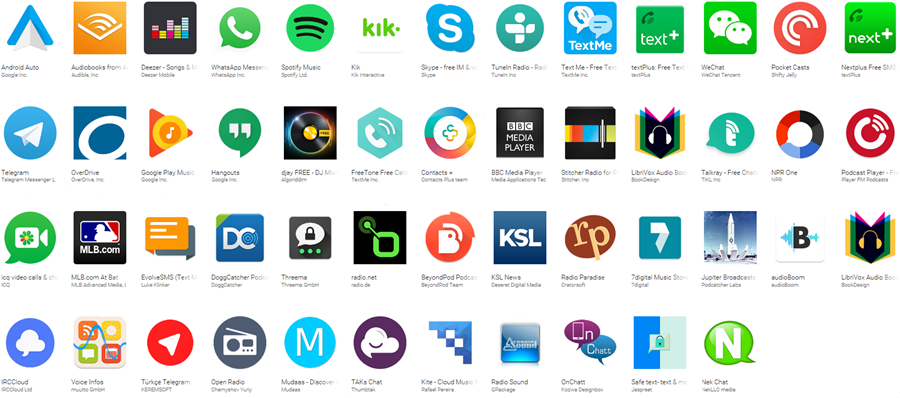
- Best OBD2 Apps for Android
- Best OBD2 Apps for iPhone
- Manufacturer-Specific Apps (FORScan and Others)
- How to Set It Up (Step by Step)
- Free vs Paid: What You Actually Need
- Frequently Asked Questions
- Sources & References
How Phone-Based OBD2 Diagnostics Work
A phone-based setup has two parts. The adapter plugs into your car’s 16-pin OBD2 port and talks to the engine computer. It then relays that data over Bluetooth or Wi-Fi to an app on your phone, which displays codes, live sensor readings, and gauges. Most affordable adapters use the ELM327 chipset (or a clone of it), which is the common language nearly every app understands.
The appeal is cost and convenience: for the price of one shop diagnostic fee you get a tool you can use forever, with a screen you already own and an app that can log data over time.
Choosing the Right Adapter (the Critical Part)
The adapter matters more than the app, and one detail trips people up constantly:
- Android works with cheap classic Bluetooth ELM327 adapters, the most common and least expensive type.
- iPhone cannot use classic Bluetooth ELM327 adapters. iPhones need either a Wi-Fi ELM327 adapter or a Bluetooth 4.0 / BLE (Low Energy) adapter. Buying a standard Bluetooth dongle for an iPhone is the number-one mistake.
Quality also varies. Very cheap clones can be unreliable or fail to read manufacturer-specific systems. A mid-tier adapter (such as a quality BLE/Wi-Fi unit, or a dedicated tool like BlueDriver) is more dependable and supports more vehicles. Whatever you buy, unplug it when not in use, a cheap adapter left in the port can slowly drain the battery.
Best OBD2 Apps for Android
| App | Strength | Cost |
|---|---|---|
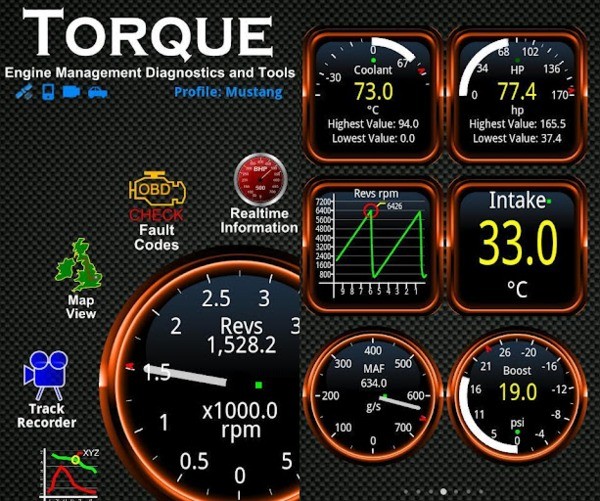
| Torque Pro | Customizable gauges, live data, logging, plugins | Paid (small) |
| Torque Lite | Free taster of Torque Pro | Free |
| Car Scanner ELM OBD2 | Excellent free features, some brand-specific PIDs | Free + paid |
| OBD Fusion | Strong live data, enhanced PIDs for some brands | Paid |
| DashCommand | Polished dashboards and performance screens | Paid |
Torque Pro is the long-time favorite for reading codes and building custom live-data dashboards. Car Scanner ELM OBD2 is the best free starting point and even unlocks some manufacturer-specific data. Either covers the vast majority of owners.
Best OBD2 Apps for iPhone
| App | Strength | Cost |
|---|---|---|
| Car Scanner ELM OBD2 | Best all-round free iOS option | Free + paid |
| OBD Fusion | Reliable codes and enhanced live data | Paid |
| EOBD Facile | Clear code reading and explanations | Free + paid |
| BlueDriver (app + sensor) | Repair reports, very reliable hardware | Paid bundle |
Remember the adapter rule: pair these with a Wi-Fi or BLE adapter, not a classic Bluetooth one. BlueDriver is a popular all-in-one because the sensor and app are designed together and it generates suggested-fix reports, though it costs more than a generic dongle.
Manufacturer-Specific Apps (FORScan and Others)
Generic apps read standard emissions data, but manufacturer-specific apps go far deeper:
- FORScan (Ford, Lincoln, Mazda) reads ABS, airbag, body modules, and lets you enable hidden features and run service functions a generic app cannot touch. It is the go-to tool for Ford owners and works on Windows, Android, and iOS (with a compatible adapter, often a switchable MS-CAN/HS-CAN dongle).
- Other brands have community and paid tools that expose ABS, transmission, and body systems beyond the generic OBD2 set.
If you own a Ford, FORScan alone is reason to put together a phone-based setup.
How to Set It Up (Step by Step)
- Buy the right adapter for your phone (classic Bluetooth for Android; Wi-Fi or BLE for iPhone).
- Plug it into the OBD2 port under the driver’s-side dash.
- Turn the ignition to ON (or start the engine for live data).
- Pair the adapter. For Bluetooth, pair in your phone settings first if required. For Wi-Fi, connect your phone to the adapter’s Wi-Fi network.
- Open the app and select the adapter in its connection settings. Set the protocol to Automatic if asked.
- Read codes, view live data, or run the function you need.
- Unplug the adapter when finished to protect the battery.
Free vs Paid: What You Actually Need
For simply reading and clearing check engine codes, a free app like Car Scanner plus a cheap adapter is enough. Step up to a paid app when you want:
- Custom live-data dashboards and logging (Torque Pro, DashCommand).
- Enhanced manufacturer PIDs beyond the generic set (OBD Fusion, Car Scanner Pro).
- Deeper module access and service functions (FORScan for Ford).
The biggest quality jump usually comes from a better adapter, not a pricier app, so spend there first if your connection is flaky.
Frequently Asked Questions
Q: Why won’t my ELM327 Bluetooth adapter work with my iPhone?
A: iPhones cannot connect to classic Bluetooth ELM327 adapters, which is the most common and cheapest type. iPhones need a Wi-Fi ELM327 adapter or a Bluetooth 4.0 / BLE (Low Energy) adapter instead. This is the single most common setup mistake. Check the adapter listing specifically says it supports iOS before buying.
Q: What is the best free OBD2 app?
A: Car Scanner ELM OBD2 is widely regarded as the best free option on both Android and iPhone, it reads and clears codes, shows live data, and even unlocks some manufacturer-specific readings. On Android, Torque Lite is another free starting point. For most owners, a free app plus a reliable adapter handles everyday code reading.
Q: Can a phone app clear my check engine light?
A: Yes. With a compatible adapter, OBD2 apps can clear stored codes and turn the light off, just like a handheld scanner. But clearing only turns the light off, it does not fix the underlying problem, so the light returns if the fault remains. Clear codes only after you have addressed the cause.
Q: Will leaving the adapter plugged in drain my battery?
A: A cheap adapter left in the port can draw a small current continuously and, over days of the car sitting, contribute to a drained battery. It is good practice to unplug the adapter when you are not using it, especially if your vehicle will be parked for a while.
Q: Do these apps work on diesels and hybrids?
A: Generic OBD2 apps read standard emissions data on most 1996-or-newer petrol, diesel, and hybrid vehicles. However, deeper systems specific to diesels (DPF, DEF) or hybrids (high-voltage battery) often need a manufacturer-specific app or an enhanced adapter, since the generic OBD2 set does not cover everything.
Q: Is FORScan better than a generic OBD2 app?
A: For Ford, Lincoln, and Mazda vehicles, yes, significantly. FORScan reads ABS, airbag, and body modules and can run service functions and enable features that generic apps cannot access. For other brands you would use a different enhanced or manufacturer tool. Generic apps remain fine for basic emissions code reading on any brand.
Sources & References
- SAE J1979 and J2012 OBD-II standards
- App developer documentation (Torque, Car Scanner, OBD Fusion, FORScan)
- ELM327 protocol documentation
- Manufacturer diagnostic information for enhanced PIDs
Related articles on CarsDailyHub:
– OBD Codes and Diagnostics: Complete Guide
– How to Use an OBD Scanner
– Complete Guide to All Car Dashboard Warning Lights
– How to Test Cold Cranking Amps With a Multimeter